
Short-form video has become one of the easiest ways to discover tutorials, entertainment, news, product ideas, and creative content. YouTube Shorts, in particular, can deliver useful information in less than a minute. Sometimes, however, you may want to keep a Short available for later viewing when you do not have a reliable internet connection.
A YouTube Shorts downloader can refer to an online service or software that processes a public Shorts URL and provides a downloadable video file. These tools can be convenient, but the method you choose matters. You should consider video quality, device compatibility, privacy, advertising, and—most importantly—whether you have permission to save or reuse the content.
This guide explains how Shorts downloading works, what features to look for, and safer ways to save videos on different devices.
What Is a YouTube Shorts Downloader?
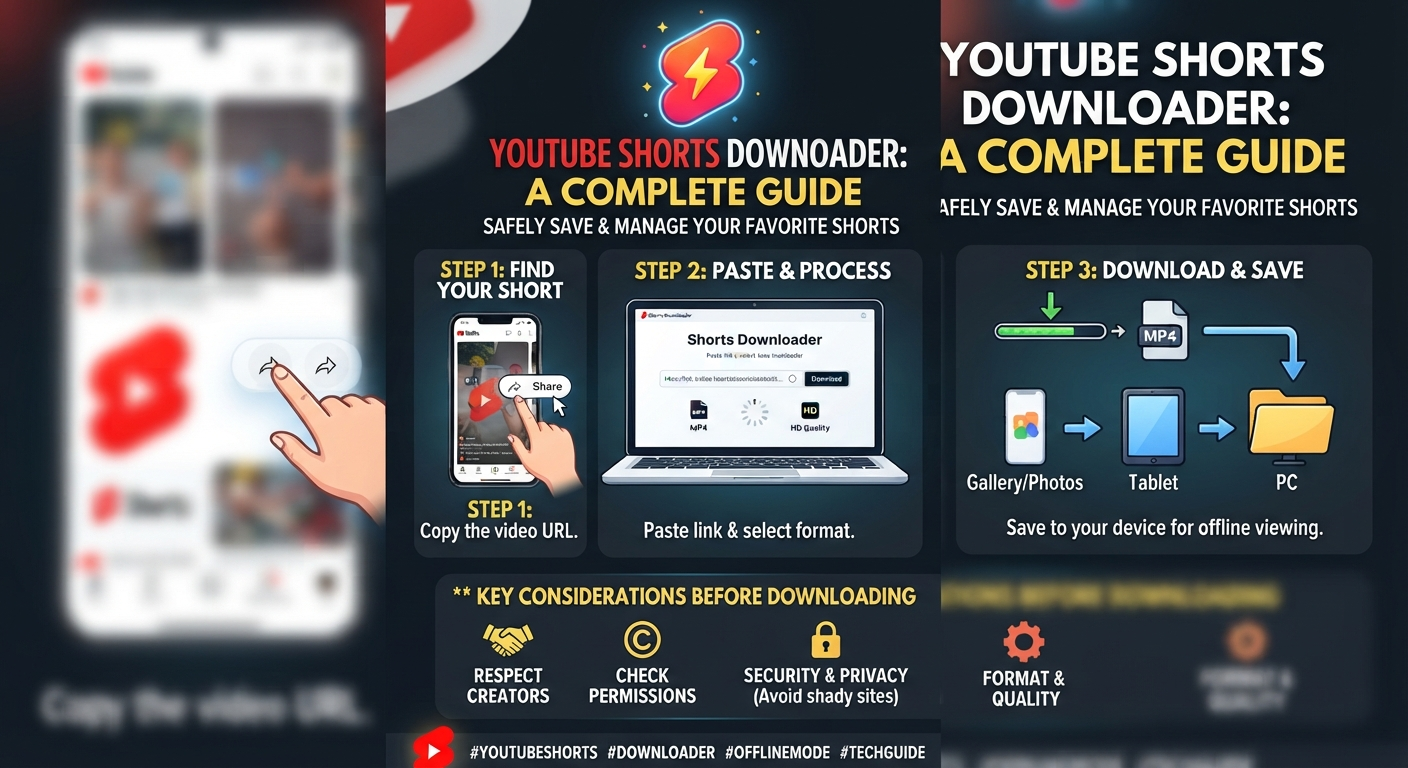
A YouTube Shorts downloader is a tool designed to help users save eligible YouTube Shorts for offline access. Depending on the service, a user generally copies the URL of a Short, pastes it into the downloader, selects an available format or quality, and processes the video.
Some services work directly in a browser, while others are built as desktop programs or mobile applications. Browser-based options are often convenient because they do not require additional software.
However, not every downloader is trustworthy. Some pages may contain aggressive advertising, misleading buttons, unnecessary permissions, or questionable downloads. For that reason, convenience should never be the only factor when selecting a Shorts download tool.
How Does YouTube Shorts Downloading Work?
The basic process is relatively straightforward.
First, the user identifies the Short they want to save and copies its URL. The link is then entered into a compatible downloader. The service processes the address and may provide available video formats or resolutions.
After selecting an appropriate option, the file can usually be saved to the device.
The exact process varies between services because different platforms have different technical limitations. A tool may also stop working if YouTube changes how video URLs or media delivery are handled.
Typical Download Process
- Open YouTube and find the Short.
- Copy the video’s share link.
- Open a reputable downloader in your browser.
- Paste the Shorts URL into the provided field.
- Select an available format or quality.
- Start the conversion or download.
- Save the resulting file to your device.
Before downloading anything, make sure you understand how you are permitted to use that particular video.
YouTube Shorts Downloader Online
An online YouTube Shorts downloader can be useful when you want to avoid installing additional software. Since the process normally takes place through a browser, it can work across many desktop and mobile devices.
This approach can be particularly convenient for occasional personal use. You can open the service, enter the video address, and complete the process without installing a dedicated application.
Still, browser-based tools require caution. Avoid services that ask for unnecessary account credentials, browser extensions, payment details for basic functions, or permissions unrelated to downloading a video.
A clean interface is preferable to a website filled with deceptive download buttons.
How to Download YouTube Shorts Videos
The general workflow is similar across most browser-based tools.
Step 1: Find the Short
Open YouTube and locate the Short you want to save. Make sure you have permission to download and use the content where required.
Step 2: Copy the Link
Use YouTube’s sharing option to copy the video’s URL. On a computer, you can generally copy the address from the browser or use the sharing controls.
Step 3: Open the Downloader
Choose a reputable Shorts video downloader that supports the type of link you are using.
Step 4: Paste the URL
Place the copied address into the downloader’s input field. Check that the URL has been entered correctly before continuing.
Step 5: Select Quality
If multiple options are available, choose a resolution appropriate for your needs. Higher quality generally produces a larger file.
Step 6: Save the Video
Start the download and select an appropriate location on your device. Once completed, you can access the file through your device’s normal file manager or downloads folder.
How to Save YouTube Shorts to Your Gallery
On mobile devices, downloaded videos may initially appear inside the browser’s Downloads folder rather than the photo gallery.
If your device does not automatically display the file in the gallery, open your file manager and locate the downloaded video. Depending on your phone and operating system, you may be able to move or copy it into the Movies or DCIM folder.
The exact behavior differs between Android and iPhone.
For iPhone users, files downloaded through Safari generally appear in the Files app. Moving compatible video files into Photos may require using the system’s sharing or save options.
YouTube Shorts Downloader for Android
Android devices provide considerable flexibility for managing downloaded files. A browser-based downloader can often be accessed without installing another application.
After downloading a video, check the Downloads folder through your file manager. If the video does not appear in your gallery automatically, moving it to an appropriate media folder may make it easier to access.
Be especially careful with downloader apps downloaded from unknown websites. Installing an APK from an unfamiliar source can create unnecessary security risks.
For occasional downloads, a reputable browser-based solution may be preferable to installing unknown software.
YouTube Shorts Downloader for iPhone
The iPhone download process is somewhat different because iOS manages files and media through separate system applications.
A downloaded file may initially be stored in the Files app. From there, compatible video files can potentially be saved or shared with Photos.
Before using any third-party service, consider whether you actually need a permanent copy. YouTube’s own features may provide a more convenient solution when your goal is simply offline viewing.
YouTube Shorts Downloader for PC
A desktop computer can provide more storage and easier file management than a phone.
After downloading a Short, you can organize the video into folders based on topic, project, date, or creator. This can be helpful when collecting videos that you have permission to use for research or editing.
For larger collections, however, downloading large numbers of videos can consume significant storage space. It is also important to respect the rights of the creators whose work you are saving.
YouTube Shorts to MP4
MP4 is one of the most widely supported video formats, which is why many people search for a YouTube Shorts to MP4 option.
An MP4 file can generally be opened by common media players and editing applications. It is also convenient when moving videos between different devices.
However, selecting MP4 does not automatically make a video free to redistribute. The file format only determines how the video is packaged; it does not change copyright ownership.
Can You Download YouTube Shorts Without an App?
In many cases, users look for a YouTube Shorts download without an app because they do not want additional software on their phone or computer.
A browser-based service may eliminate the need to install an application. This can reduce storage use and avoid granting an unfamiliar app access to your device.
Even so, browser tools should be evaluated carefully. Check the website’s behavior, avoid suspicious pop-ups, and never provide sensitive credentials simply to download a public video.
Downloading Shorts in HD
Video quality depends on the source and the method used to process it. If a Short was originally uploaded at a certain resolution, a downloader cannot magically create genuine detail beyond the source material.
Some tools advertise HD or higher-resolution downloads. Before selecting a large file, consider whether the extra quality is actually useful for your device or intended purpose.
For simple offline viewing, a moderate resolution may provide a good balance between visual quality and storage consumption.
Free YouTube Shorts Downloader: What to Watch For
Many online tools advertise themselves as free Shorts downloaders. Free access can be convenient, but there may be trade-offs.
Some websites rely heavily on advertisements. Others may limit quality, speed, or the number of downloads available.
When evaluating a free service, look for:
- A straightforward interface
- No unnecessary account registration
- No request for sensitive personal information
- Clear download controls
- Reasonable advertising
- Secure browsing
- Transparent privacy information
- Support for the device you are using
A service that appears free but constantly redirects users to unrelated pages may not be worth the risk.
Is a YouTube Shorts Downloader Safe?
Safety depends on the specific service rather than the concept of downloading itself.
A trustworthy tool should not require unnecessary permissions or demand your YouTube password. Be cautious if a website asks you to install unknown browser extensions, executable programs, or mobile applications before providing a basic download.
You should also scan unfamiliar files with appropriate security software before opening them.
Never enter your Google account credentials into a third-party downloader merely because the page claims that authentication is required.
Why Some YouTube Shorts Downloaders Stop Working
Downloader services can occasionally become unavailable or produce errors.
One common reason is a change in how YouTube delivers video content. A third-party service may need to update its technology to work with those changes.
Other problems can include:
- Invalid video URLs
- Private videos
- Deleted Shorts
- Temporary server problems
- Unsupported formats
- Network interruptions
- Regional restrictions
- Browser compatibility issues
If a tool suddenly stops working, avoid installing random software simply because another website promises an instant solution.
Common Download Errors and Solutions
Invalid URL
Make sure you copied the complete Shorts link. Try copying the link again directly from YouTube.
Download Button Does Nothing
The page may be experiencing a temporary technical problem. Refreshing the page or trying a reputable alternative may help.
Poor Video Quality
The original Short may have been uploaded at a lower resolution, or the downloader may offer only limited quality options.
File Will Not Play
The downloaded file could be incomplete or encoded in a format your media player does not support. Re-downloading or using a compatible player may resolve the problem.
Downloaded File Is Missing
Check your browser’s Downloads section and your device’s file manager. On mobile devices, downloaded content does not always appear automatically in the gallery.
YouTube’s Built-In Offline Options
A third-party downloader is not always necessary.
YouTube provides its own mechanisms for offline viewing in supported circumstances, depending on the user’s location, account, device, and available features. These options are generally preferable when your only objective is watching content later without an internet connection.
The important distinction is that offline viewing through YouTube is not necessarily the same as obtaining an independent video file.
If you only need temporary offline access, the official YouTube option may be the simpler choice.
YouTube Shorts Downloader and Copyright
This is one of the most important considerations.
Downloading a video does not transfer ownership of that video to you. The creator may retain copyright over the visual material, music, narration, graphics, or other elements included in the Short.
Personal access and redistribution are also different matters.
For example, saving a Short for your own reference does not automatically give you permission to upload the same video to another platform, use it in commercial content, or claim it as your own work.
Before reusing downloaded material, check the creator’s permissions and the applicable copyright rules.
Can You Reupload Downloaded YouTube Shorts?
Simply downloading a Short does not mean you can legally reupload it.
Reuploading another creator’s video without appropriate permission can lead to copyright complaints or platform enforcement. Adding a small change, watermark, caption, or crop does not automatically remove copyright restrictions.
If you want to publish someone else’s material, obtain the necessary permission or use content that is appropriately licensed for your intended use.
How to Choose the Best YouTube Shorts Downloader
The best tool depends on your actual requirements.
If you only need an occasional personal download, simplicity may matter most. If you are working with authorized content for editing, you may care more about resolution, format compatibility, and file management.
Consider these factors:
| Feature | Why It Matters |
|---|---|
| Video quality | Determines visual clarity |
| Format support | Helps compatibility with devices |
| Browser access | Avoids unnecessary installation |
| Privacy | Protects personal information |
| Speed | Reduces waiting time |
| Interface | Makes the process easier |
| Device support | Useful across mobile and desktop |
| Security | Reduces exposure to harmful downloads |
Do not choose a service solely because it claims to offer unlimited or extremely fast downloads.
Benefits of Using a Shorts Download Tool
A suitable downloader can provide several practical advantages when used appropriately.
Offline access: You can keep authorized content available when connectivity is limited.
Convenient file management: Independent files can be organized alongside other media.
Editing workflows: Creators can work with content they own or have permission to edit.
Device flexibility: Browser-based tools may work across phones, tablets, and computers.
Reference material: Researchers, students, and content teams may find saved authorized clips useful for legitimate reference purposes.
Limitations to Keep in Mind
Downloading also comes with disadvantages.
Large video files consume storage. Third-party services can disappear or stop working. Some websites contain intrusive advertising. Video quality may vary, and downloaded files may not contain the same information or metadata as the original content.
Most importantly, downloading does not remove copyright obligations.
For these reasons, a downloader should be viewed as a technical convenience—not as a license to copy or redistribute anything found online.
Frequently Asked Questions
What is a YouTube Shorts downloader?
It is a website, application, or software tool that can process eligible YouTube Shorts links and provide a video file for saving, depending on the service and applicable restrictions.
Can I download YouTube Shorts for free?
Some third-party services offer free downloading, although their features, quality, advertising, and availability can vary.
Can I download Shorts without installing an app?
Yes, browser-based services may allow downloads without installing dedicated software. Always evaluate the site’s safety before using it.
Can I download YouTube Shorts on my phone?
The technical process can work on many Android and iPhone devices, although file-management steps differ between operating systems.
Can I download YouTube Shorts as MP4?
Some services provide MP4 output. Availability and quality depend on the particular tool and source video.
Why does my YouTube Shorts download fail?
Possible causes include an invalid URL, private or unavailable content, temporary server problems, unsupported formats, or changes to YouTube’s video delivery system.
Is downloading a YouTube Short the same as owning it?
No. Saving a video file does not transfer copyright or ownership from the original creator.
Final Thoughts
A YouTube Shorts downloader can be useful when you need an authorized video copy for offline access, personal reference, or a legitimate editing project. Browser-based tools are often convenient because they do not require additional software, while desktop solutions may offer better file management for larger projects.
The smartest approach is to prioritize security, reasonable quality, privacy, and clear usage rights. If your goal is simply to watch a Short without an internet connection, YouTube’s own offline features may be a better option.
Most importantly, remember that technical accessibility and copyright permission are two separate things. Save and reuse Shorts responsibly, respect creators’ rights, and avoid services that put your device or personal information at unnecessary risk.
